Parcels that actually tile: Avoid Overlaps

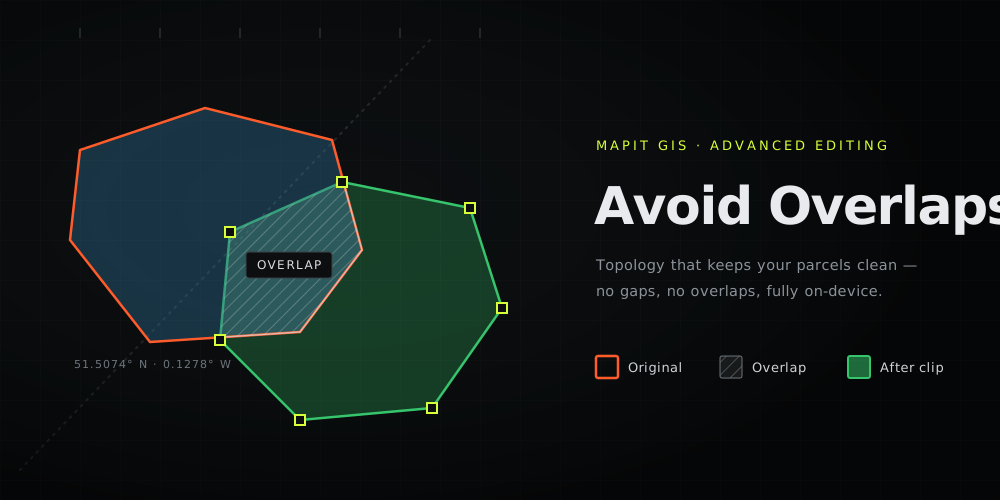
Every surveyor knows the quiet little lie in a hand-digitised parcel layer: the boundaries don't quite line up. Trace a new plot next to an existing one and you either leave a hairline gap or, more often, a sliver of overlap. The overlap gets counted twice, the parcel areas stop adding up, and the "clean" dataset you hand over isn't.
Vertex Snapping got you onto the existing vertices. Avoid Overlaps finishes the job: a topology rule that makes sure the polygon you just drew never overlaps the ones already there - on the phone, in the field, fully offline.
Draw sloppy, save clean
This is the part that changes how you capture. You no longer trace a shared boundary by hand. You draw your polygon so it deliberately crosses over the neighbour - be generous - and finish the edit. Mapit detects the overlap and offers to clip your shape back to the neighbour's real edge:
Overlap detected - This polygon overlaps 1 existing feature. Clip to the shared boundary?
A preview shows your shape in red and the clipped result in green. Tap Apply and your polygon stops exactly on the neighbour's boundary, inheriting its vertices along the shared edge - so the two features share one mathematically identical line. No gap. No overlap. No re-tracing.
Enclaves get a hole
Drew a parcel that completely surrounds an easement or a building footprint? Clipping would leave nothing, so Mapit offers the other move:
This polygon fully covers 1 existing feature. Cut a matching hole so both features coexist?
Apply, and you get a clean donut - the outer parcel with an interior ring around the enclosed feature. Both coexist, neither overlaps.
It works across layers
Avoid Overlaps is set per layer. Flag your parcels layer, your buildings layer, your zoning layer (up to three), and editing any one of them clips against the whole set. Keep your themes separate, keep them mutually exclusive.
Why it matters
For cadastral and professional capture this is the difference between data that looks right and data that is right - parcels that tile an area with no gaps and no double-counted slivers, ready for area calculation, registration, and any serious GIS downstream. The geometry runs on JTS (Android) and GEOSwift (iOS), both wrapping the same GEOS engine QGIS uses, so the result matches the desktop.
Avoid Overlaps joins Split, Merge, Buffer and Vertex Snapping in the Pro+ Advanced Editing toolkit. Piece by piece, the field app is closing the gap on the desktop - and on this one, it arrives on Android and iOS together.
Read the full guide, with the step-by-step on both platforms: Avoid Overlaps (Topology).