2 posts tagged with "advanced-editing"

View All Tags

Parcels that actually tile: Avoid Overlaps

· 3 min read
Andrzej Bieniek
Mapit GIS Founder
Mapit GIS - Avoid Overlaps topology

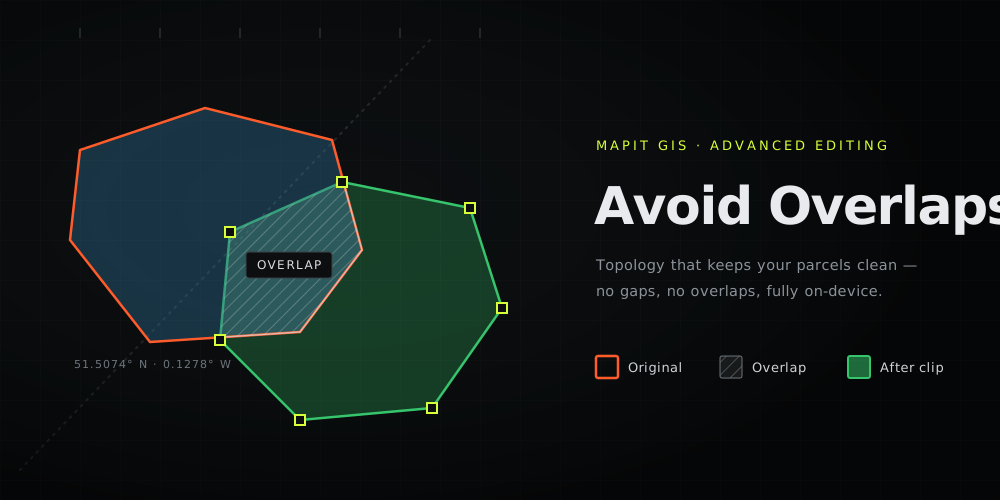
Every surveyor knows the quiet little lie in a hand-digitised parcel layer: the boundaries don't quite line up. Trace a new plot next to an existing one and you either leave a hairline gap or, more often, a sliver of overlap. The overlap gets counted twice, the parcel areas stop adding up, and the "clean" dataset you hand over isn't.

Vertex Snapping got you onto the existing vertices. Avoid Overlaps finishes the job: a topology rule that makes sure the polygon you just drew never overlaps the ones already there - on the phone, in the field, fully offline.

Advanced Editing comes to Mapit GIS

· 6 min read
Andrzej Bieniek
Mapit GIS Founder
Pro Editing Toolkit: Split, Buffer, Merge

For over a decade, the answer to "I need to split this polygon" or "I need to buffer that line" has been the same: stop what you're doing, walk back to the truck, transfer the file to a laptop, and open QGIS. Not any more.

The latest Mapit GIS Android release brings a full Advanced Editing toolkit straight to the map. The four operations you used to fire up a desktop GIS for now ship in your pocket: Split, Merge, Buffer, and proper Vertex Snapping. All running on-device, fully offline, against native GeoPackage.