Units & Coordinates
The Units & Coordinates settings control how positions, distances, and areas are displayed throughout Mapit GIS. You can choose from several coordinate formats, set a custom EPSG projection code, and configure measurement units.
- Android
- iOS
Go to Settings > Units & Coordinates to access these options.
Coordinate system
Select how coordinates are displayed on the map, in feature lists, and during data export.
| Option | Format | Example |
|---|---|---|
| WGS84 (D.dddd) | Decimal degrees | 51.50134, -0.12797 |
| WGS84 (D M.mm) | Degrees decimal minutes | 51 30.08040' N, 0 7.67838' W |
| WGS84 (D M'S.ss) | Degrees minutes seconds | 51 30' 04.824'' N, 0 7' 40.703'' W |
| Web Mercator | EPSG:3857 metres | 3857285.42, -14245.67 |
| British National Grid | EPSG:27700 metres | 530034.000, 179706.000 |
| UTM ETRS89 | Auto-detected UTM zone | 33U 456789.12, 5678901.23 |
| UTM (MGRS) | NATO Military Grid | 33UVP 56789 78901 |
| Custom EPSG | Any supported code | User-defined |
Custom EPSG code
Select Custom: EPSG code and enter any EPSG code supported by the projection library. This is useful for national or regional coordinate systems not listed in the preset options. The app supports thousands of EPSG codes - if the code is invalid or unsupported, you will see an error and the system reverts to WGS84.
Length unit
Choose the unit for distance measurements and line lengths:
- Meters (m)
- Yards (yd)
- Kilometers (km)
- Miles (mi)
- Feet (ft)
- Nautical miles (nmi)
- Sazhen (saz)
Area unit
Choose the unit for polygon area calculations:
- Square meters (m2)
- Hectares (ha)
- Ares (a)
- Square kilometers (km2)
- Square miles (mi2)
- Acres (ac)
- Square feet (ft2)
- Square nautical miles (nmi2)
- Square sazhen (saz2)
- Chinese Mu
High-accuracy CRS grids
High-accuracy CRS grids require a Mapit Pro Plus subscription.
When you select a coordinate system that has a compatible datum transformation grid, a High-Accuracy Datum Grid option appears in the settings. These grids provide centimetre-level coordinate accuracy by replacing the default mathematical datum transformation (TOWGS84 parameters) with a dense grid of measured corrections.
How it works
Without a grid, coordinate transformations between local datums and WGS84 use a 3 or 7-parameter Helmert transformation. This gives typical accuracy of 2-10 metres depending on the datum. With a grid enabled, the transformation uses thousands of surveyed control points interpolated across the coverage area, achieving sub-metre or even centimetre-level accuracy.
The grid correction is applied automatically to:
- Map display - coordinates shown on screen
- Feature selection - coordinates in the feature details sheet
- Import - shapefiles and other files in the local projection
- Export - data exported to the local projection
- Edit geometry - manual coordinate entry
- Search - coordinate search in the local projection
Downloading and enabling a grid
- Select a supported coordinate system (preset or custom EPSG code)
- The High-Accuracy Datum Grid section appears below the coordinate system selector
- Tap Download Grid to download the grid file to your device
- Toggle Use high-accuracy grid to enable the correction
Grid files are downloaded once and stored locally. They range from 59 KB to 51 MB depending on the country and grid density.
Supported grids
- Europe
- Oceania
- Americas
| Country | Grid | EPSG codes | Size |
|---|---|---|---|
| United Kingdom | OSTN15 (OSGB36 to ETRS89) | 27700 | 15 MB |
| Portugal | Datum 73 to ETRS89 | 27493 | 1 MB |
| Portugal | Datum Lisboa to ETRS89 | 20790 | 1 MB |
| France | NTF to RGF93 | 27561-27564, 27571-27574 | 271 KB |
| Germany | DHDN BeTA2007 to ETRS89 | 31466-31469 | 82 KB |
| Spain | ED50 to ETRS89 | 23028-23031 | varies |
| Netherlands | Amersfoort/RD to ETRS89 | 28992 | 59 KB |
| Belgium | BD72 to ETRS89 | 31370 | 5.3 MB |
| Switzerland | CH1903 to CH1903+ | 21781 | 3.2 MB |
| Italy | Roma40 to WGS84 | 3003, 3004 | 973 KB |
| Iceland | ISN93 to ISN2016 | 3057 | 2.0 MB |
| Latvia | LKS-92 to LKS-2020 | 3059 | 538 KB |
| Czech Republic | S-JTSK corrections | 5514, 5513, 2065 | 286 KB |
| Slovakia | S-JTSK corrections | 5514, 5513, 2065 | 682 KB |
| Country | Grid | EPSG codes | Size |
|---|---|---|---|
| Australia | GDA94 to GDA2020 (conformal) | 28349-28356 | 51 MB |
| New Zealand | NZGD49 to NZGD2000 | 27200, 27291, 27292 | 311 KB |
| Country | Grid | EPSG codes | Size |
|---|---|---|---|
| USA (CONUS) | NAD27 to NAD83 | 26710-26719 | 517 KB |
| Canada | NAD27 to NAD83 | 26707-26709, 26720-26722 | 13 MB |
Grid sources
All grids are derived from official geodetic authority data:
- UK: Ordnance Survey
- Portugal: DGT (Direcao-Geral do Territorio)
- France: IGN (Institut Geographique National)
- Germany: AdV/BKG (Bundesamt fur Kartographie und Geodasie)
- Netherlands: NSGI (Netherlands Partnership of Geodetic Infrastructure)
- Belgium: IGN Belgium (Institut Geographique National)
- Switzerland: swisstopo (Federal Office of Topography)
- Italy: IGM (Istituto Geografico Militare)
- Iceland: LMI (Landmaelingar Islands)
- Latvia: LGIA (Latvian Geospatial Information Agency)
- Australia: ICSM (Intergovernmental Committee on Surveying and Mapping)
- New Zealand: LINZ (Land Information New Zealand)
- USA: NOAA/NGS (National Geodetic Survey)
- Canada: NRCan (Natural Resources Canada)
- Czech Republic: CUZK (Czech Office for Surveying, Mapping and Cadastre)
- Slovakia: UGKK (Geodetic and Cartographic Institute)
Technical details
The app uses two types of correction grids:
NTv2 grids (UK, Portugal, France, Germany, Spain, Netherlands, Belgium, Switzerland, Italy, Iceland, Latvia, Australia, New Zealand, USA, Canada) operate in geographic coordinate space. They store latitude and longitude shifts in arcseconds at regular grid intervals. The app performs bilinear interpolation between grid nodes for sub-grid accuracy. For export (WGS84 to local datum), an iterative inverse transform converges to sub-millimetre precision in 3 iterations.
Projected-space grids (Czech Republic, Slovakia) store easting and northing corrections in metres, applied directly to Krovak projected coordinates. These use bilinear interpolation on a regular grid in the projected coordinate space.
Go to Settings → MAP & DATA → Units & Coordinates to access these options.
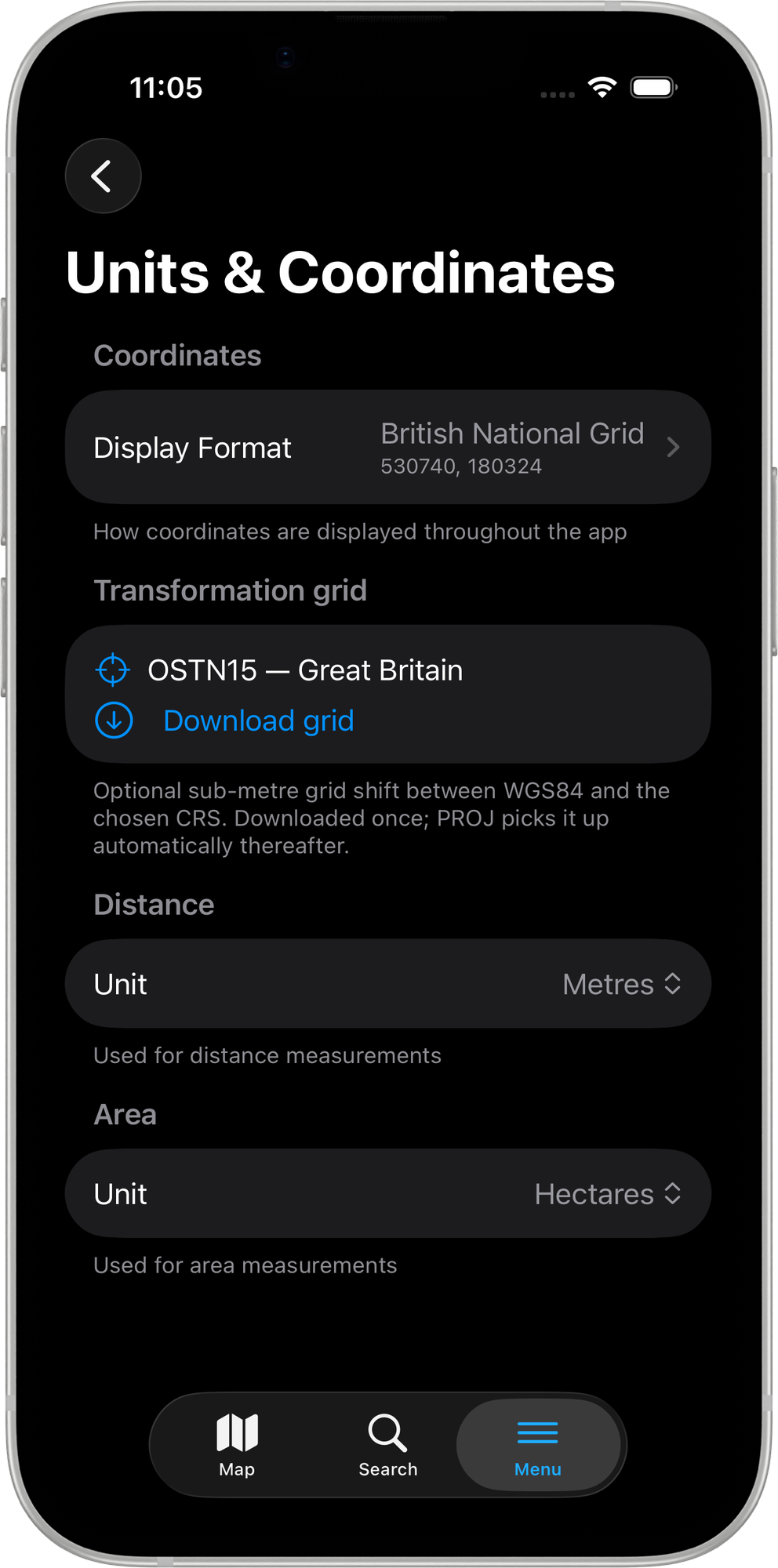
Display Format
The Display Format setting controls how coordinates are shown throughout the app — on the map, in the feature details sheet, and in all exports. It also sets the output CRS for every layer export. Tap Display Format to open the picker.
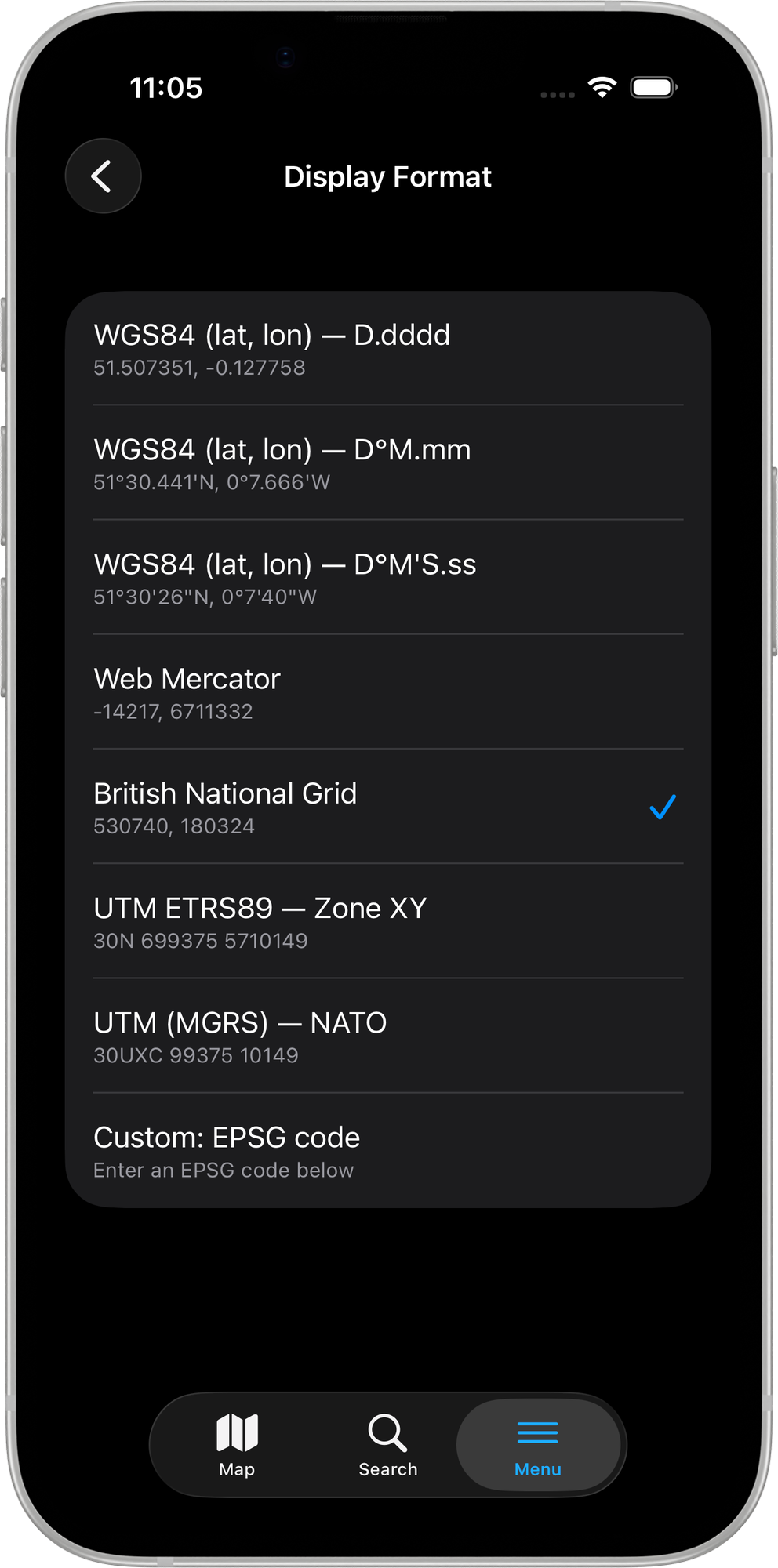
Eight options are available:
| Option | Format | Example |
|---|---|---|
| WGS84 (lat, lon) — D.dddd | Decimal degrees | 51.507351, -0.127758 |
| WGS84 (lat, lon) — D°M.mm | Degrees + decimal minutes | 51°30.441'N, 0°7.666'W |
| WGS84 (lat, lon) — D°M'S.ss | Degrees-minutes-seconds | 51°30'26"N, 0°7'40"W |
| Web Mercator | EPSG:3857 metres | -14217, 6711332 |
| British National Grid | EPSG:27700 | 530740, 180324 |
| UTM ETRS89 — Zone XY | Auto-zone UTM with ETRS89 datum | 30N 699375 5710149 |
| UTM (MGRS) — NATO | NATO Military Grid Reference | 30UXC 99375 10149 |
| Custom: EPSG code | Any PROJ-supported code | User-defined |
The selected format drives both on-map coordinate display and the output CRS for all layer exports. There is no separate per-export CRS picker.
Custom EPSG code
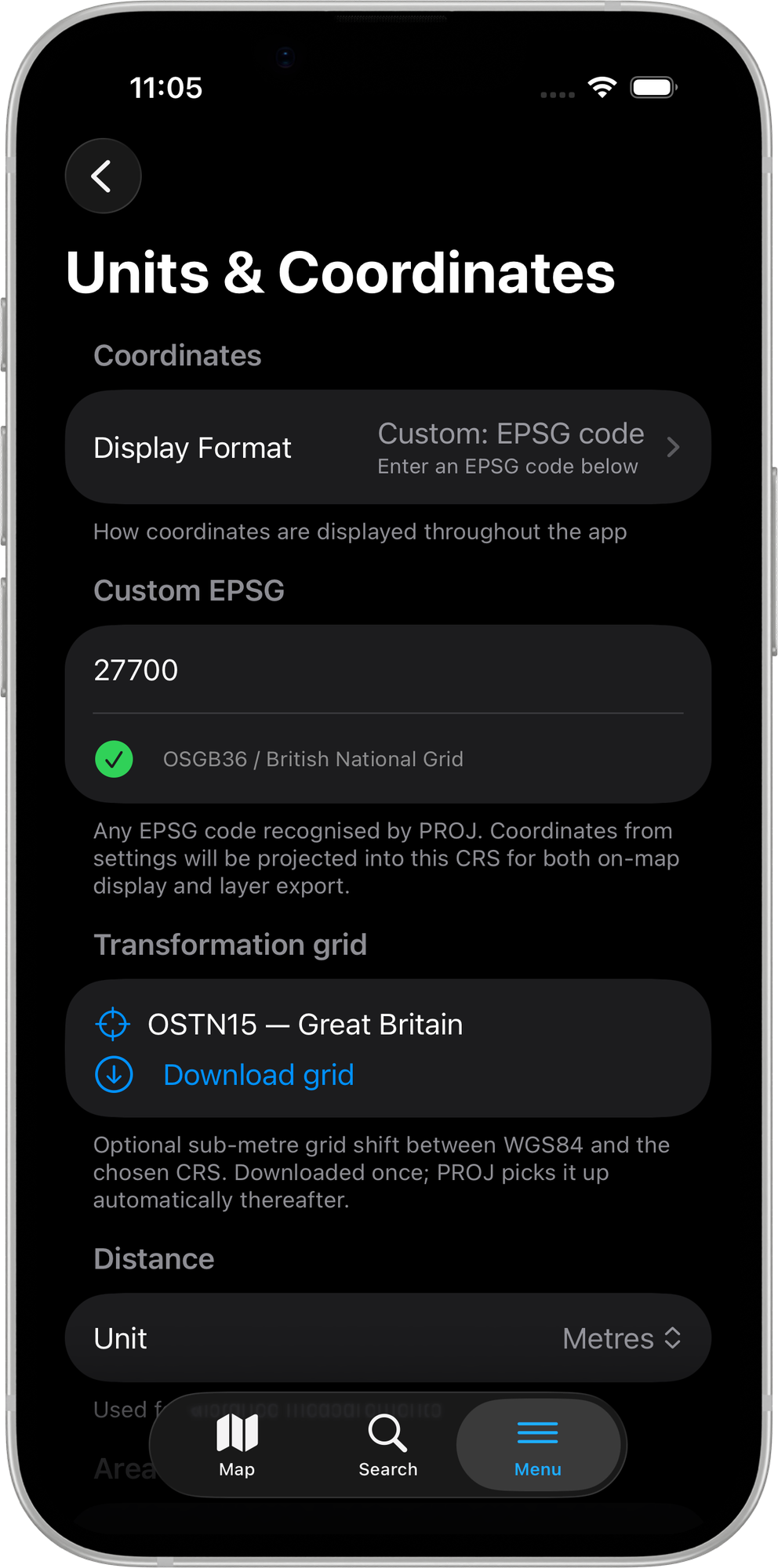
Select Custom: EPSG code and a text field appears immediately below the picker. As you type, the app resolves the code against the built-in PROJ database after a short pause (~600 ms):
- A green tick with the full projection name confirms a valid code (e.g.
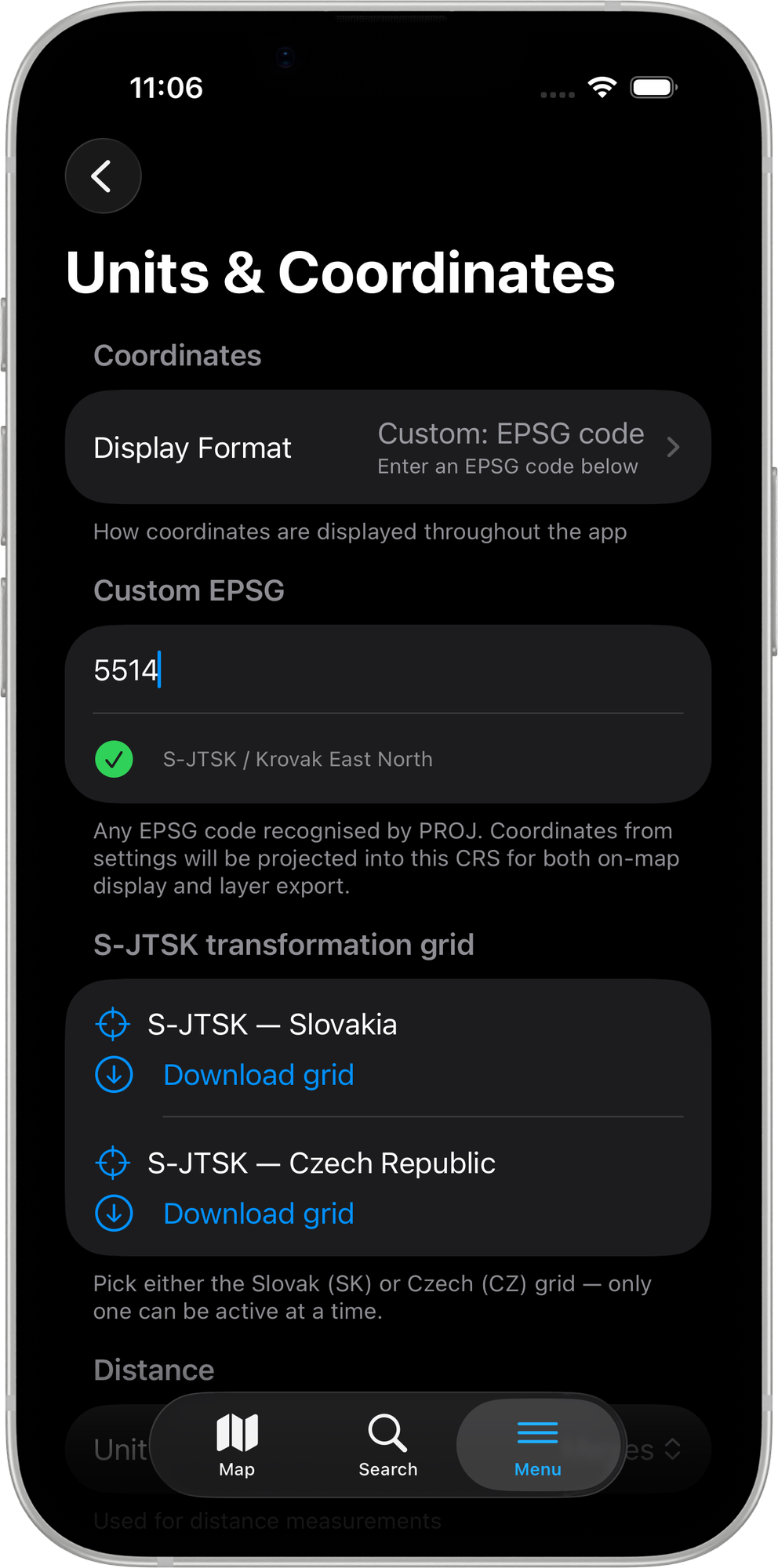
27700→ OSGB36 / British National Grid,28992→ Amersfoort / RD New,5514→ S-JTSK / Krovak East North). - An orange warning reading Projection not supported appears for invalid or unrecognised codes.
Distance and Area units
The Distance and Area sections appear below the coordinate settings. Seven length units and ten area units are available — the defaults are Metres and Hectares respectively.
Transformation grid
Downloading and enabling transformation grids requires a Mapit Pro Plus subscription. Free and Pro users can see the grid section but tapping Download grid or the Use grid toggle opens the Pro+ paywall.
When the chosen Display Format has a registered high-accuracy datum grid, a Transformation grid section appears below the coordinate settings. These grids replace the default Helmert transformation with a dense bilinear-interpolated grid of surveyed control points, achieving sub-metre or centimetre-level accuracy.
NTv2 grids
For most coordinate systems the section shows a single grid entry with a Download grid button. Once downloaded, the button is replaced by a Use grid toggle.
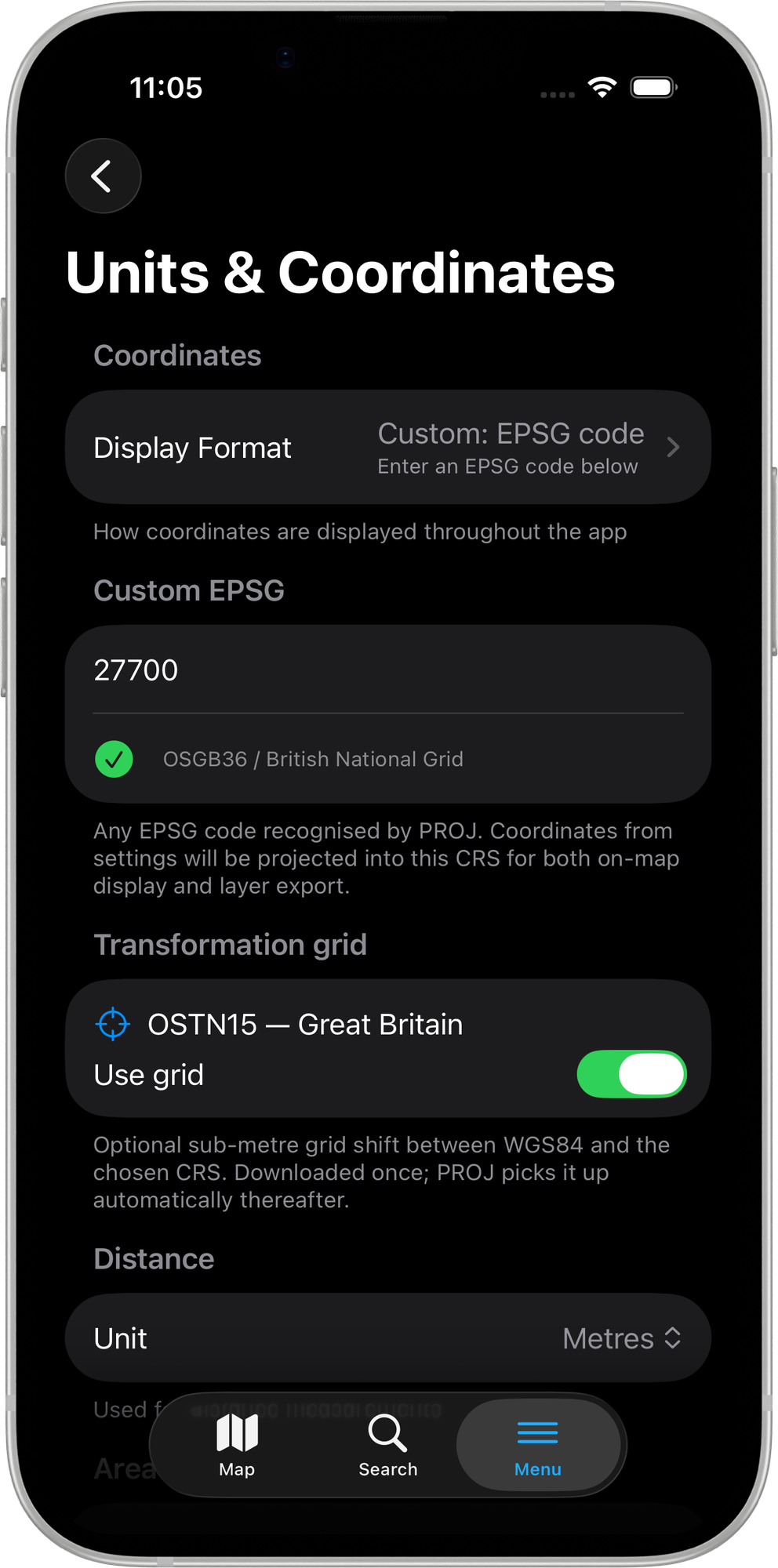
Grid files are downloaded once directly from mapitgis.com and stored locally. They are picked up automatically by PROJ on subsequent launches — no further configuration is required.
When a grid is active, the correction is applied to all coordinate display, import, export, manual coordinate entry, and search operations.
If your Pro+ subscription lapses, active grids are silently disabled the next time you open the Units & Coordinates settings screen.
S-JTSK transformation grids (Czech and Slovak)
When the custom EPSG code resolves to a Czech or Slovak S-JTSK projection (EPSG codes 5514, 5513, or 2065), the section is labelled S-JTSK transformation grid and shows two separate entries — one for Slovakia and one for Czech Republic.
Only one grid can be active at a time. Enabling the Slovak grid automatically disables the Czech one, and vice versa.
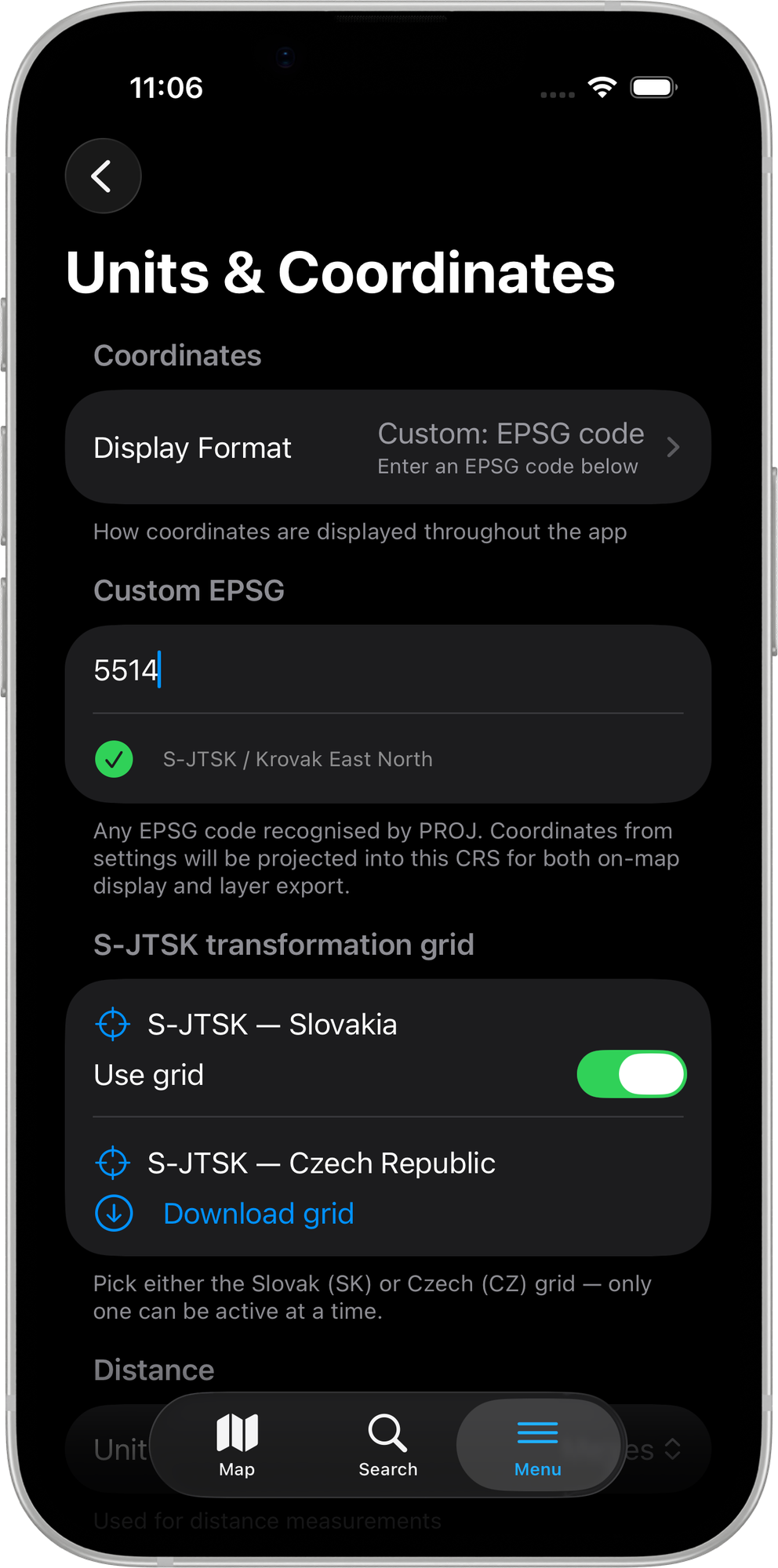
Supported grids
49 NTv2 grid entries and 2 S-JTSK projected-space grids are included, covering:
| Region | Countries |
|---|---|
| Europe | United Kingdom (OSTN15), Portugal, France, Germany, Spain, Netherlands (RDNAPTRANS2018), Belgium, Switzerland, Italy, Iceland, Latvia |
| Oceania | Australia, New Zealand |
| Americas | USA (CONUS), Canada |
| Central/Eastern Europe | Czech Republic (S-JTSK), Slovakia (S-JTSK) |
See Mapit Pro Plus for the full feature overview.